
Introducing APTrust Docs: A Single Home for APTrust Documentation
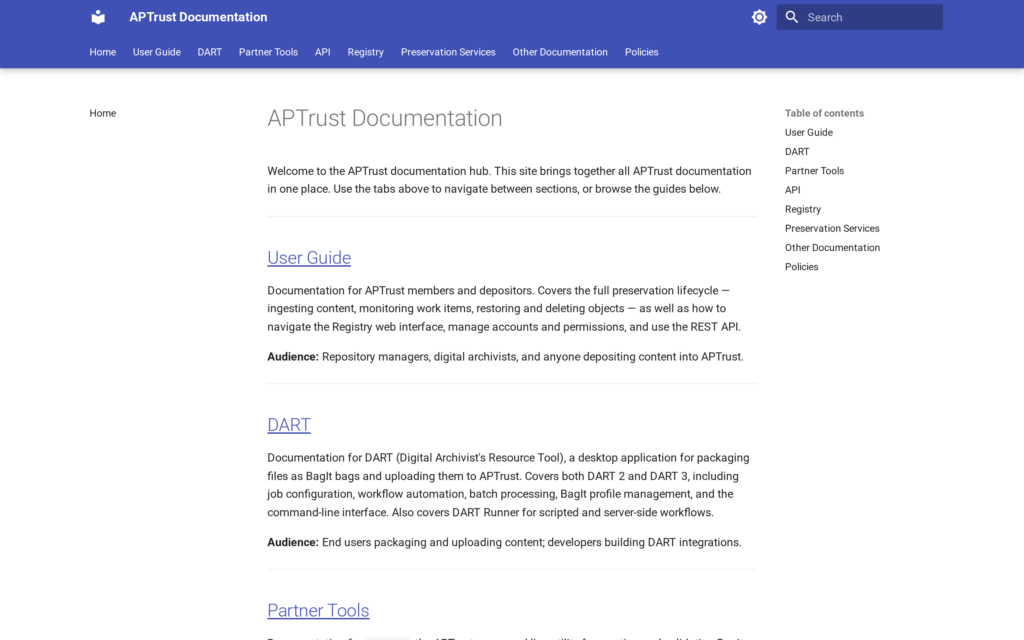
For years, APTrust’s documentation has lived in several separate places. Members looking for help depositing content, packaging bags in DART, or navigating the Registry had to know which of two GitHub Pages sites held the answer, and staff-facing technical documentation for Preservation Services and Registry development lived on two more sites again. Each guide was built with the same tool, Python’s mkdocs, but they didn’t share a search function, a URL structure, or consistent branding. Finding the right page often meant guessing which guide it lived in first.
APTrust is pleased to announce that all of this documentation has been consolidated into a single platform at docs.aptrust.org.
What’s changed
One site, one search. The former User Guide, DART documentation, Registry Member API reference, Preservation Services documentation, and Registry development documentation are now sections within a single mkdocs-based site. A single search box searches across all of them, so a query about, for example, deposit guidelines can surface relevant pages from the User Guide, the API reference, and DART documentation in one pass, something the previous sites couldn’t do.
A proper APTrust home. Documentation now lives at an APTrust URL and carries APTrust branding, rather than being split across aptrust.github.io subdomains.
No broken links. Every page on the four original sites now redirects seamlessly to its new location, so existing bookmarks, citations, and links from other parts of the APTrust website will continue to work. That said, please update any bookmarks or links to point to docs.aptrust.org going forward.
Accessibility improvements. The migration included a number of accessibility fixes across the documentation, along with a published accessibility statement for the site.
Better search engine visibility. Every page now includes a meta description tag, making it easier for search engines, and the people using them, to find the right documentation page directly.
Usage insight, for the first time. APTrust has also implemented web analytics using Matomo across the documentation site. This is the first time APTrust has had visibility into which documentation pages get used and how, information that can help identify where guides are unclear or where additional documentation is needed.
What’s inside
The new site organizes documentation into clear sections: the member-facing User Guide, covering the full preservation lifecycle from ingest through restoration and deletion, as well as Registry navigation and account management; DART documentation for both DART 2 and DART 3, including DART Runner; Partner Tools documentation for apt-cmd; an interactive API reference for the APTrust Member REST API; and, for developers and APTrust staff, technical documentation covering Registry and Preservation Services. Rounding things out are an Other Documentation section pointing to additional resources hosted on aptrust.org, and a Policies section pointing to APTrust’s board-approved governance documents.
Finding it on the website
The Resources menu on the APTrust website has also been updated. The new documentation site is listed there as User Documentation. APTrust’s website still hosts other documentation as well, including Trusted Digital Repository materials, software landing pages, and member-restricted technical resources, which remains listed separately under Documentation.
Try it out
Visit docs.aptrust.org to explore the new site. If you run into a page that seems out of place, a broken link, or anything else that isn’t working as expected, please reach out to help@aptrust.org; the improved analytics will help the team keep refining the documentation, but direct feedback from members and the wider digital preservation community is still the most valuable signal APTrust has.
Categories: News